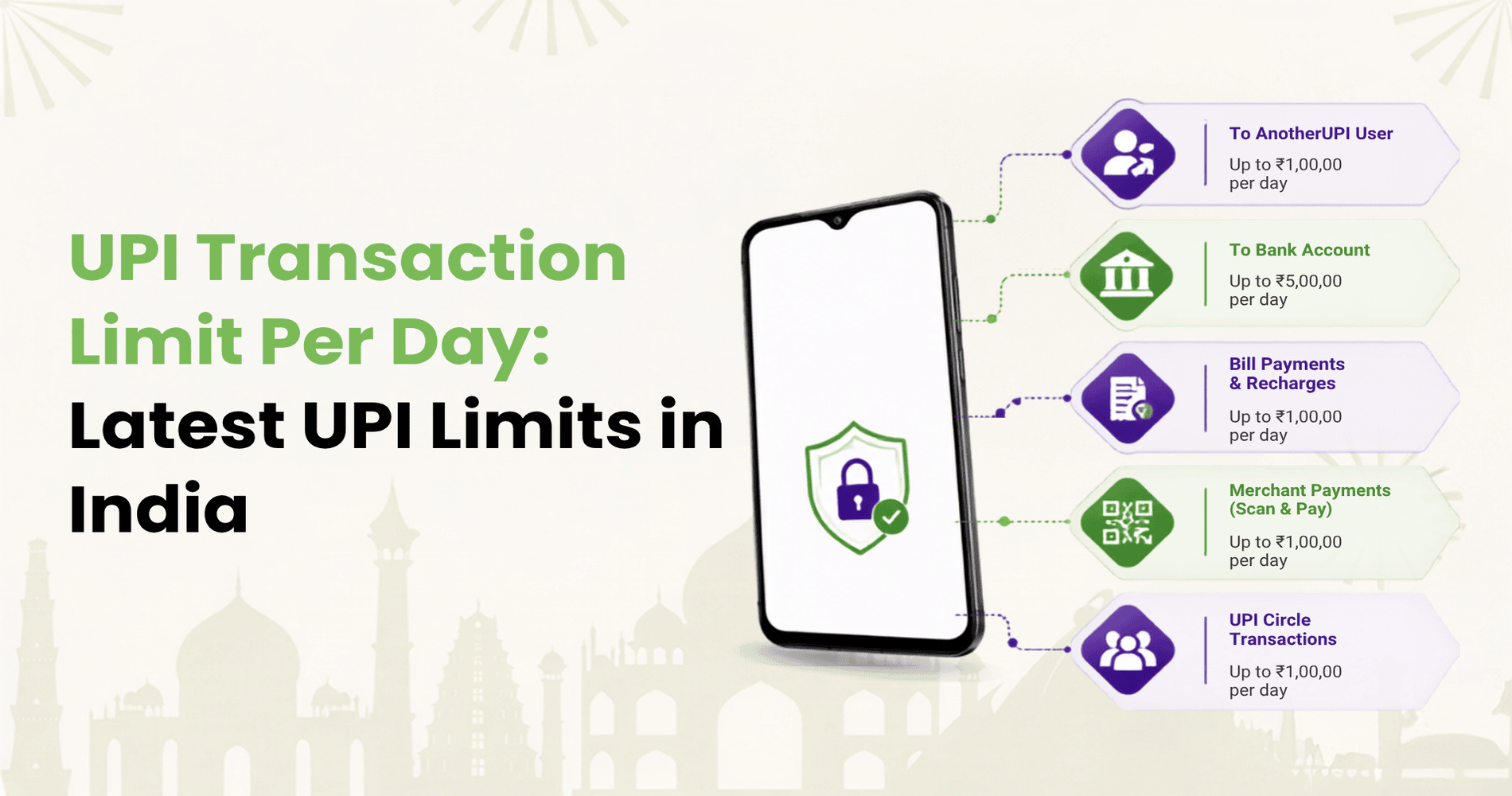
What is the maximum transaction limit in GPay? For most Indian users, the standard Google Pay UPI limit is up to ₹1,00,000 in one day across all UPI apps linked to the same bank account. The actual amount you can send may be lower because your bank, account type, Google Pay checks, and the transaction category can all apply their own limits.
GPay works on UPI, so the limit is not decided by Google Pay alone. A payment can be restricted by UPI rules, your bank’s daily cap, your bank’s per-transaction cap, the age of your UPI setup, and whether the payment is a normal transfer or an eligible merchant payment.
If GPay shows a message such as limit exceeded, payment limit reached, or bank declined, it does not always mean there is an app issue. It usually means one of these limits has been reached.
Quick Answer: GPay Limit At A Glance
| GPay transaction type | Usual limit |
|---|---|
| Standard UPI daily transfer limit | Up to ₹1,00,000 in one day across all UPI apps |
| Standard single UPI transaction limit | Usually up to ₹1,00,000, subject to bank limits |
| Request money on Google Pay | Up to ₹2,000 at a time |
| New user or recently changed phone, number, or UPI PIN | May be restricted to ₹5,000 for the first 24 hours |
| Special verified merchant categories | Can be higher, depending on category, bank, and merchant eligibility |
Think of ₹1,00,000 as the broad ceiling for normal UPI transfers. It is not a fixed limit for every user, every bank, or every transaction.
Is The GPay Limit Per App Or Across All UPI Apps?
For normal UPI transfers, assume the daily limit applies across all UPI apps linked to the same bank account, not just GPay. Google Pay Help says users can send up to ₹1,00,000 in one day across all UPI apps, while the user’s bank can apply its own send and receive limits.
For example, if you send ₹40,000 from your bank account through PhonePe in the morning and then try to send ₹70,000 from the same bank account through GPay, the second payment may fail. The combined UPI transfers would cross ₹1,00,000.
This is why switching apps does not always solve a GPay limit error. If the limit is being applied by your bank or by UPI rules, another UPI app may show a similar failure.
GPay Per Day Limit For Normal UPI Transfers
The standard GPay limit per day for regular UPI payments is up to ₹1,00,000. You may use this limit in one eligible transaction or through multiple smaller payments during the day, depending on your bank’s rules.
However, bank-wise limits can differ. Google Pay’s bank-wise UPI limits page lists separate transaction and daily limits for supported banks. Many major banks show ₹1,00,000 as the transaction and daily limit, but some banks, cooperative banks, rural banks, payment banks, or specific account types may have lower caps.
The limit that matters is the lowest applicable limit. If UPI allows ₹1,00,000 but your bank allows only ₹50,000, your practical limit is ₹50,000.
GPay Per Transaction Limit
For normal UPI transfers, the maximum amount for one GPay transaction is usually up to ₹1,00,000. But this depends on the bank account linked to GPay.
| Situation | What may happen |
|---|---|
| Your bank allows ₹1,00,000 per UPI transaction | A single ₹1,00,000 payment may go through if other checks pass |
| Your bank allows ₹50,000 per UPI transaction | A ₹75,000 payment may fail even if your daily limit is unused |
| Your account is newly linked or recently changed | A temporary lower limit may apply |
| The payment is flagged for review | The app or bank may block it even below the usual limit |
If a large payment fails, try a smaller amount only if splitting is acceptable for the recipient and purpose. If it still fails, check your bank’s UPI limit or wait for the limit window to reset.
GPay Request Money Limit
Sending money and requesting money are different on Google Pay. Google Pay Help says users can request up to ₹2,000 at a time from a Google Pay contact.
This does not mean your send-money limit is ₹2,000. It only applies to the request-money feature. If you are paying someone, normal UPI and bank limits apply.
Why New Users May See A ₹5,000 GPay Limit
New UPI users may face a temporary lower limit. You may also see a lower limit if you recently changed your phone, mobile number, or UPI PIN. Several current GPay limit guides report this as a ₹5,000 first-24-hours restriction, and Google’s bank-wise page also shows some new-customer bank limits separately from standard bank limits.
This type of restriction is meant to protect your account during setup or sensitive changes. If your GPay limit is suddenly ₹5,000, check whether you recently registered on Google Pay, linked a new bank account, changed your phone, changed your mobile number, or reset your UPI PIN.
If yes, waiting for the 24-hour period to pass may solve the issue.
What Counts Towards Your GPay Daily Limit?
Your GPay limit can be used up by different UPI payments, including:
- Sending money to another person.
- Paying a merchant by scanning a QR code.
- Paying through a UPI ID or mobile number.
- Making bill payments through UPI.
- Completing app or website payments that redirect to GPay.
The exact treatment can depend on your bank and payment category, but it is safest to assume that normal UPI debits from the same bank account count towards your daily limit.
For example, if you pay ₹10,000 for utilities, ₹15,000 for shopping, and ₹25,000 to a friend, you may have already used ₹50,000 of your daily UPI limit from that bank account.
Do Merchant Payments Have The Same Limit?
For everyday merchant payments, the same general UPI limit may apply. If you scan a QR code at a shop, pay for groceries, book a cab, or complete a normal online checkout through GPay, your bank and UPI limits still matter.
However, some verified merchant categories can have higher UPI limits. NPCI circulars and payment-industry references describe higher UPI limits for specific categories, including:
- Tax payments.
- Hospitals and educational institutions.
- IPO applications.
- RBI Retail Direct Scheme payments.
- Select capital market, insurance, travel, and government-linked categories, depending on current NPCI rules and merchant verification.
These exceptions are not for every merchant. Your bank, the app, NPCI rules, and the merchant category must all support the higher limit.
Can You Transfer ₹2,00,000 Through GPay?
For a normal UPI transfer, you generally cannot transfer ₹2,00,000 in one day through GPay from the same bank account if the applicable daily limit is ₹1,00,000.
A higher amount may be possible only when the transaction falls under an eligible higher-limit merchant category and all participants support it. That usually means a verified merchant payment, not a regular person-to-person transfer.
For important payments such as fees, hospital bills, taxes, or investments, confirm the supported UPI limit before the due date. Do not wait until the last hour of payment.
Can You Increase The GPay Transaction Limit?
You cannot simply raise the standard GPay UPI limit from the app settings.
If your payment is failing because of a bank-level limit, contact your bank. Some banks may allow changes for certain account types, while others may not. Google Pay also says your bank has its own limits on how much you can send or receive.
You can try these steps:
- Check whether you are a new user or under a temporary 24-hour restriction.
- Confirm your bank’s UPI transaction and daily limit.
- Try a lower amount if the payment is urgent and splitting is acceptable.
- Wait until the next day if you have reached the daily limit.
- Contact your bank if the transaction is below the stated limit but still fails.
Avoid unofficial tricks to bypass the limit. They may fail, and for sensitive payments they can create delays.
Why GPay Says Limit Exceeded
GPay may show a limit error for several reasons:
- You have already used your daily UPI amount limit.
- You have hit a transaction-count limit through multiple smaller payments.
- Your bank has a lower per-transaction or daily cap.
- You are under a temporary security restriction after a new setup or account change.
- The transaction has been blocked by bank, app, or payment-system risk checks.
If your payment fails, start with the simplest checks. Look at the amount, count your other UPI payments from the same bank account, check your bank limit, and see whether you recently changed your device, number, or UPI PIN.
If the payment is still important, contact your bank or use another authorised payment method. Do not repeatedly retry large failed payments without understanding the reason.
GPay Limit And UPI Credit Cards
Google Pay supports UPI payments from bank accounts, and some UPI apps also support RuPay credit card on UPI for eligible merchant payments. Credit card on UPI is not the same as unrestricted money transfer.
RuPay credit card on UPI is mainly designed for merchant payments. It is useful for everyday spends such as groceries, food delivery, fuel, shopping, bill payments, and QR payments where credit-card-on-UPI is accepted.
It is not meant to turn UPI into a general credit transfer tool for every scenario. Restrictions can apply to person-to-person transfers, cash-like payments, and certain categories.
This matters when you compare GPay with a UPI-on-credit app such as Kiwi. If your goal is to send money to another person, normal UPI bank-account limits are the primary concern. If your goal is to pay merchants through UPI and manage spends with credit, RuPay credit card on UPI becomes relevant.
Where Kiwi Fits In For Everyday Merchant Payments
If you are reading about GPay limits because you use UPI every day, it may be worth thinking beyond limits and looking at how you pay.
Kiwi helps users pay merchants via UPI using a RuPay credit card on UPI. That means everyday QR payments can be made with credit where the merchant and transaction are eligible. You can also track card spends, repayments, and rewards in the app.
Kiwi’s public pages highlight 1.5% cashback on eligible scan and pay transactions, a lifetime free credit card, and Kiwi Neon Membership benefits, such as 5% cashback on spends over ₹1.5L and airport lounge access, subject to current terms. Eligibility, bank criteria, merchant category, and offer terms matter.
So here is a simple way to decide:
- Use GPay or any UPI app when you want standard bank-account UPI transfers.
- Use Kiwi when your main use case is merchant payments with RuPay credit card on UPI, app-based card control, and rewards-led everyday spending.
The interesting part is not just the payment limit. It is what your regular UPI spends can do for you. If daily QR payments are already part of your routine, Kiwi can help turn eligible merchant payments into a more rewarding credit-backed payment option.
Tips To Stay Within GPay Limits
- Use one primary UPI account for planned payments.
- Avoid too many small test payments before a large payment.
- Do not change your UPI PIN or device right before a high-value payment unless necessary.
- Check bank-wise limits before making a payment close to ₹1,00,000.
- Keep an alternate authorised payment method ready for fees, hospital bills, taxes, or investment payments.
- For merchant payments, check whether the merchant supports the required UPI or credit-card-on-UPI flow before checkout.
Common Myths About GPay Limits
Myth 1: GPay always allows ₹1,00,000 per transaction
Not always. ₹1,00,000 is the common upper limit for standard UPI transfers, but your bank may set a lower limit.
Myth 2: You can bypass the limit by switching UPI apps
Not if the limit is tied to your bank account or UPI framework. Payments through other UPI apps may count towards the same daily limit.
Myth 3: Merchant payments are always unlimited
No. Normal merchant payments still have limits. Higher limits apply only to eligible categories and verified merchants.
Myth 4: Credit card on UPI can be used for every UPI payment
No. RuPay credit card on UPI is mainly for eligible merchant payments. It is not a universal replacement for all bank-account UPI transfers.
Final Takeaway
The maximum transaction limit in GPay is usually up to ₹1,00,000 per day for standard UPI transfers, but the real limit depends on your bank, account status, transaction type, and security checks. Request-money limits are lower, new users may face temporary caps, and special merchant categories may allow higher UPI limits only when all conditions are met.
For regular users, the best approach is simple: know your bank limit, plan large payments early, and do not assume that switching apps will bypass UPI rules. For everyday merchant payments, consider whether a RuPay credit card on UPI app such as Kiwi can make those same QR payments more useful through credit, rewards, and app-based spend control.
FAQs On GPay Transaction Limit
What is the maximum transaction limit in GPay?
For most normal UPI transfers in India, the maximum GPay transaction limit is up to ₹1,00,000 in one day across all UPI apps. Your bank may set a lower transaction or daily limit.
What is the GPay per transaction limit?
The usual per-transaction limit is up to ₹1,00,000 for standard UPI transfers, subject to your bank’s limit, account status, and risk checks.
Why is my GPay limit only ₹5,000?
You may be under a temporary restriction if you are a new UPI user or recently changed your phone, mobile number, or UPI PIN. This restriction may apply for the first 24 hours.
Can I transfer ₹2,00,000 through GPay?
Usually not for a normal UPI transfer from the same bank account in one day. Higher UPI limits may apply only for eligible verified merchant categories and supported payment flows.
Can I increase my GPay limit?
You cannot simply raise the standard GPay UPI limit from the app. If the restriction is bank-level, contact your bank. If it is a temporary new-user or security limit, wait for the restriction period to end.
Can I use a RuPay credit card on UPI instead of my bank account?
You can use a RuPay credit card on UPI for eligible merchant payments on supported apps and flows. It is not meant for every type of UPI transfer. Kiwi is built around this merchant-payment use case, with RuPay credit card on UPI, rewards, and app-based card control.
Disclaimer: GPay and UPI transaction limits, bank-wise caps, new-user restrictions, merchant-category limits, request-money limits, security checks, and payment eligibility rules are subject to change based on Google Pay, NPCI, RBI, issuing banks, and payment-network policies. The limits mentioned in this article are general reference values and may differ depending on the user’s bank, account type, transaction category, device changes, UPI registration status, and risk controls. Information related to RuPay credit cards on UPI, Kiwi cashback, rewards, membership benefits, card fees, lounge access, and eligibility criteria is also subject to the latest issuer and partner terms. This article is intended only for educational and comparative purposes and does not constitute financial, banking, or payment advice. Users should verify the latest limits, fees, eligibility conditions, and terms on the official Google Pay, NPCI, Kiwi, and respective bank websites before making a transaction or applying for a credit card.